Solar installer resources
Solar installer resources
This page provides the information solar installers need to connect a rooftop solar system to our network. We outline the steps in the connection process, the hardware approved for connection, and what you need to do to meet the Victorian Government’s emergency backstop requirements.


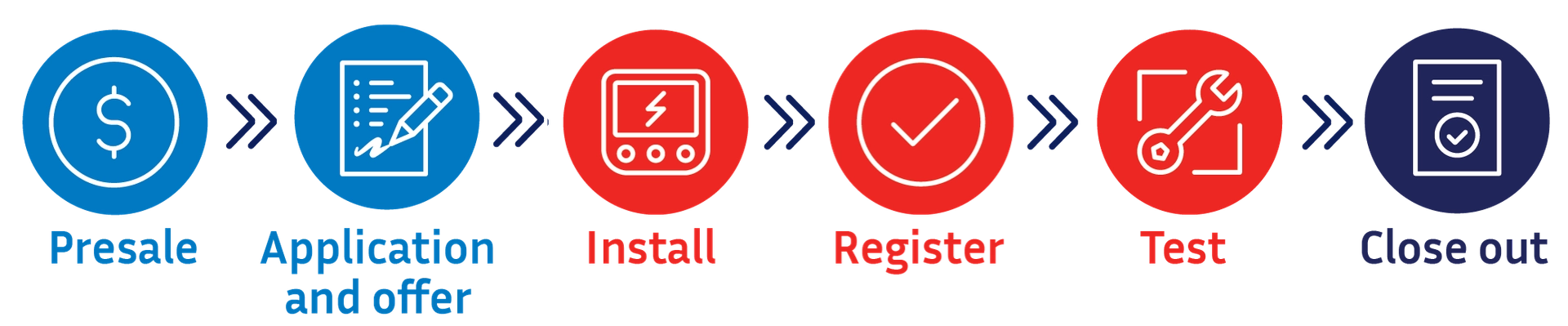
Steps to connection
All new, upgrading and replacement rooftop solar systems with 200kVA of capacity or less must be emergency backstop enabled. To be emergency backstop enabled, a solar system must be able to communicate using the Common Smart Inverter Profile Australia (CSIP-AUS) technology protocol and be connected to the internet.
Before you go
Planning
- Consult with the customer to understand their needs and explain the solar installation and connection process.
- Check the Clean Energy Council website (opens external site in a new window) for approved CSIP-AUS ready solar and battery inverters and software communication clients.
- Check our list of solar and battery inverters approved to connect to our networks.
- Confirm the customer has a reliable internet connection.
Application and offer
- Check with the manufacturer to make sure you have the required hardware for the installation, including an export limiting meter and any required communication device.
- Make sure you have received your pre-approval outcome via email. If required, sign and upload the generator agreement to eConnect for validation prior to installation.
- Pre-approval outcome – confirm the customer has received their outcome and understands the terms of their connection agreement.
While on site
Install
- Install the approved solar or battery inverter, export limiting meter, and gateway/communication device as per the manufacturer's installation guide.
- Ensure the device has the latest firmware. Check the inverter is set to Region A settings AS4777.2.2020.
- Configure the inverter and associated equipment to the customer’s internet.
Register
- Register the customer’s solar inverter via the manufacturer’s app.
- Create and verify a Long Form Device Identifier (LFDI) for the inverter.
- Confirm successful registration with CitiPower or Powercor.
Test and close out
Test
- Allow about five minutes after registering to start the test - it can take a few minutes for the registration to reach our server.
- Ensure the solar system is generating at least 500W and batteries are operating as outlined before starting the test.
- Initiate the capability test (takes about 10 minutes).
- Confirm capability test is successful.
- Follow these steps for any sites with a legacy inverter.
Close out
- Arrange for a Licensed Electrical Inspector (LEI) to inspect and approve the installation.
- Submit the alteration in eConnect. Attach the Certificate of Electrical Safety (CoES), evidence that Region A settings have been configured and serial numbers matching submitted AC-connected devices.
- The DER will be registered and confirmed after the solar alteration request has been completed and paperwork validated by CitiPower/Powercor. This may take a few days and will allow the approved export limit to be activated.
Need help?
Our New Energy Services team are the first point of contact for solar installers. Contact them at newenergyservices@powercor.com.au or on 1800 772 940 (8am-4pm, Monday to Friday).
